
The multi-cloud foundation has been the major strategic focus for SAP BTP because of its significant benefits as compared with the Neo environment, including its principles of openness and freedom of choice in terms of support for multiple infrastructure providers, data centers, and a wide range of runtimes and programming languages.
Why Migrate?
SAP has confirmed that the Neo environment will be sunset on December 31st, 2028 and scenarios on Neo must be migrated to the multi-cloud foundation.
This blog helps in learning why and how to migrate from the Neo environment to the multi-cloud foundation for SAP Business Technology Platform (BTP).
This guide addresses SAP BTP customers who have at least one existing scenario (combination of several different applications, services, and integrations) in the SAP BTP, Neo environment that they must move to the multi-cloud foundation.
To simplify your migration process as much as possible, take the following approach:

In this blog, we will try to deep dive into all these steps.
What is the Multi-Cloud Foundation?
The multi-cloud foundation is an open source, industry standard Platform-as-a-Service (PaaS) that is offered by SAP BTP. Customers can choose from different infrastructures, environments and runtimes to develop, run, and manage our applications and services.

Key Points:
- Allows to develop and deploy cloud applications in both private and public cloud environments offered primarily by Hyperscalers.
- It promises high availability of the platform.
- Offers 80 + services including technical and business.
- Supports a wide range of runtime and programming languages.
- Supports various databases.
SAP BTP Multi-Cloud Foundation offers 3 major environments:
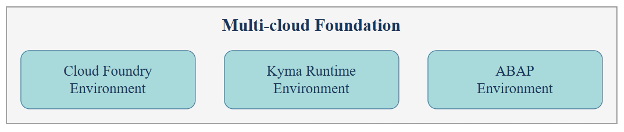
These environments provide specific tools and resources tailored to different types of software projects, making it easier for businesses to choose the right space for their specific needs within the SAP BTP ecosystem.
Cloud Foundry Environment
SAP BTP, Cloud Foundry is an open source, industry standard Platform-as-a-Service (PaaS) technology for developing and deploying cloud applications. It enables us to develop new business applications and business services, supporting multiple runtimes, programming languages, libraries, and services.
- Runs on various IaaS providers: AWS, Azure, GCP, Alibaba Cloud.
- Uses container-based architecture for app execution.
- SAP is a founding member of the Cloud Foundry Foundation.
- Ideal for building, extending, and integrating enterprise applications.
Mostly used for building modern, cloud-based applications with both web and mobile compatibility using top programming languages, tools and developer frameworks provided out-of-the-box.
Kyma Environment
SAP BTP, Kyma runtime provides a fully managed cloud-native Kubernetes application runtime based on the open-source project “Kyma”.
- Supports CAP, SAP Cloud SDK, HTML5 apps, and application router.
- Runs on a Kubernetes cluster provisioned via Gardener.
- Enables native multi-cloud service consumption.
- Connects easily to SAP and non-SAP systems.
- Integration with other SAP services and products (for example: SAP BTP (Services), SAP S/4HANA, SAP SuccessFactors, and so on).
Ideally used to deploy highly scalable, robust, and secure containerized microservices.
ABAP Environment
SAP BTP, ABAP environment (a.k.a Steampunck) allows you to create extensions for ABAP-based products, such as SAP S/4HANA Cloud and develop new cloud applications. We can transform existing ABAP-based custom code or extensions to the cloud.
- Supports the development of new cloud applications using ABAP.
- Leverages SAP HANA innovations for performance and scalability.
- Includes familiar components from Application Server ABAP.
- Supports ABAP RESTful Application Programming Model (RAP), SAP Fiori, and Core Data Services (CDS).
- Offers released SAP services and APIs for secure and stable integration.
- Integrates with other SAP BTP services like:
- SAP Destination service
- SAP Build Work Zone
- SAP Build Process Automation
- SAP Interactive Forms by Adobe
Comparison Between the Neo Environment and the Multi-Cloud Foundation
Understanding the benefits of SAP’s Multi-Cloud Foundation compared to the Neo environment is essential. It empowers you to make informed decisions and confidently plan your migration journey.
| Category | Neo Environment | Multi-Cloud Environment |
| Cloud Provider Support | Only SAP Data Centers | Supports multiple hyperscalers: AWS, Azure, GCP, Alibaba Cloud – giving flexibility in choosing infrastructure. |
| Architecture | Proprietary, limited scalability | Open-source, container-based architecture (Cloud Foundry PaaS & Kyma Kubernetes) for high scalability & agility. |
| Programming Languages | Limited (Java, HTML5, SAPUI5) | Polyglot support: Java, Node.js, Python, Go, etc. – enabling diverse development needs. |
| Custom Domains | No | Can be configured. |
| Service Availability | Limited SAP BTP services | Access to a broader and continuously growing set of SAP BTP services and innovations. |
| Extensibility | Basic extension capabilities | Advanced extensibility using CAP (Cloud Application Programming Model), RAP, and event-driven microservices. |
| Integration | SAP-only integration | Seamless integration with SAP and non-SAP systems using APIs, events, and connectors. |
| DevOps & CI/CD | Manual or limited support | Full DevOps support with CI/CD pipelines, GitHub Actions, Jenkins, and automated deployment tools. |
| Runtime Environments | Proprietary runtime | Choice of Cloud Foundry (PaaS) or Kyma (Kubernetes) for flexible and modern app deployment. |
| Scalability | Limited | High scalability with container orchestration (Kyma) and dynamic resource allocation (Cloud Foundry). |
| Security & Compliance | SAP-managed | Enterprise-grade security with hyperscaler compliance, regional data residency, and identity federation. |
| Innovation & Future Proof | Slower innovation, legacy focus | Rapid innovation with open standards, community-driven updates, and future-ready architecture. |
| Migration Support | Manual, limited tools | SAP provides guided missions, migration tools, and best practices via SAP Discovery Center. |
| Environment Types | Single environment | Multiple environments: Cloud Foundry for apps, Kyma for microservices, ABAP for legacy extension in cloud. |
| Developer Experience | Basic tooling (Web IDE) | Rich developer experience with SAP Business Application Studio, CLI tools, and Git-based workflows. |
| Cost Optimization | Fixed infrastructure | Multiple Subcription Models available. Example: Pay-as-you-go model with hyperscaler pricing, better resource utilization, and cost control. |
| Platform Availability | High | Provide very high availability by following the availability zones (AZ) concepts and recommendations. Applications and services are deployed across multiple AZs. Each AZ is an individual data center with separate power and internet connections. |
Evaluation Criteria for Migration
Before starting your migration, understand and answer the aspects listed below for each scenario that needs to be migrated.
- Purpose of your scenario
- Components involved
- Dependency
- Complexity
- Criticality
Compare your scenarios and order them according to their complexity and business criticality. The best scenario to begin your migration is with the one that is least complex and least important for the continuation of your business. This allows you to get familiar with the new multi-cloud foundation environment which eases the migrations of other scenarios.
Migration Approach
SAP offers multiple migration packs tailored to the artifacts present in your Neo environment. As a first step, it’s important to analyze these available packs to understand which components SAP can migrate automatically and which ones will require manual migration by customers/partners.
SAP led Migration
This approach is recommended when the migration involves SAP-managed services or infrastructure-level changes that require SAP’s internal tools, access, or expertise.
- Requires raising a migration request with SAP.
- SAP performs environment assessment and provides migration timelines.
- Typically includes infrastructure provisioning, service reconfiguration, and data migration.
Few example components:
- Database Migration: Neo runs on HANA 1.0, while multi-cloud uses HANA 2.0 or HANA Cloud. SAP must handle the DB migration.
- SAP Analytics Cloud (SAC): If SAC is hosted on SAP’s Neo data center, migration to CF requires SAP’s involvement.
- SAP-provisioned services: Services like Document Management, Workflow, or Mobile Services that are tightly coupled with SAP infrastructure.
- Contractual or licensing dependencies: If your Neo services are part of SAP-managed contracts, SAP will handle the transition.
Migration Packs:
SAP provides migration packs for:
- Document Management
- Workflow
- Mobile Services
- Cloud Integration
- API Management
Customer led Migration
This approach is suitable for custom developments, integrations, and application-level migrations that can be handled by the customer or their implementation partner.
- Requires detailed analysis of application structure and dependencies.
- Migration packs and tools (Postman collections, Docker images, etc.) are available from SAP.
- Security configurations (OAuth, SAML) must be recreated manually.
- Offers flexibility and control over timelines and customization.
Challenges and Recommendations
Migrating from SAP BTP Neo to Multi-Cloud (Cloud Foundry) is a strategic move, but it comes with several technical, operational, and architectural challenges. Understanding these helps in planning better and avoiding disruptions.
- Some services available in Neo are not available in Cloud Foundry or may be split into multiple services. So, we need to have awareness of CF services to identify equivalent services.
- Security settings like OAuth and SAML cannot be copied over. You have to recreate them manually in the new environment.
- Java and UI5 applications need to be restructured. You must remove Neo-specific files and adjust configurations to work in CF.
- Integration flows (iFlows) built in Neo may not fully migrate using SAP tools. You might need to manually update endpoints and credentials.
- Some features in Neo, like freestyle portal sites and older mobile apps, are not supported in CF. These need to be rebuilt or replaced.
- Offline mobile models may not work if they are not properly synchronized before migration.
- Roles and authorizations in Neo do not directly match those in CF. You will need to manually recreate and test them.
- HANA XS Classic applications must be rebuilt using newer tools like CAP (Node.js or Java). Kyma runtime is another option but not widely used yet.
- Setting up the CF environment requires planning. You need to understand new concepts like spaces and orgs.
- After migration, you will get new URLs for your applications. You also need to update authorization settings and security configurations.
Post Migration Impacts
After migrating from SAP BTP Neo to Multi-Cloud (Cloud Foundry), there are a few important things to know.
Once the migration is complete, your applications will have new URLs. The old Neo URLs will stop working after a certain period. For SAP-led migrations, the old URLs may work for up to 30 days. For customer-led migrations, they may work for around 20 days. After that, users will be redirected to the new CF URLs if domain services are properly configured.
During migration, the source tenant (Neo) can still be used. However, any changes made in Neo after migration starts will not be carried over to CF. So, it’s best to freeze changes during the migration window.
You will need to reconfigure some settings after migration. This includes:
- Reconnecting identity providers (IDPs)
- Re-entering credentials for live connections
- Recreating OAuth clients and security settings
- Updating endpoints and URLs in integrations and mobile apps
These steps are part of post-migration activities and vary depending on the services and applications you use.
There may be temporary disruptions while reconfiguring security and connectivity. But your source code, metadata, and licenses can be reused without issues.
The migration itself is cost-free from SAP unless you subscribe to new services. However, some manual effort is needed to ensure everything works smoothly in the new environment.
Impact & Value to organizations
Migrating to multi-cloud offers long-term benefits for your organization.
- Enabling Innovations.
Cloud Foundry opens the door to modern technologies like:
- Microservices
- Multi-language development
- AI, machine learning, and automation tools
These capabilities are not available in Neo and will help you stay ahead in your digital transformation journey.
- Aligning with industry standards.
Cloud Foundry is supported by major cloud providers like AWS, Azure, and GCP. Migrating ensures your systems are compatible with global platforms and ready for the future.
- Improving Transparency
With Cloud Foundry, you gain better visibility into service usage and costs across teams. This helps you manage budgets and optimize operations more effectively.
- Modernization
The new environment supports agile development, faster deployment, and better integration. This means quicker time-to-market and improved customer experiences.
Reach out to us at info@sbpcorp.com to create a tailored roadmap for migrating your scenarios to SAP BTP. Our experts at SBP will ensure all components involved in your scenarios are considered for a smooth and efficient migration.